How Is Kafka So Fast If It Writes to Disk?
Most people think disks are slow. So how does Apache Kafka — a system that persists data to disk — handle millions of messages per second? The trick is not that Kafka avoids disk. The trick is how it uses the operating system and disk I/O patterns efficiently.

Yasindu Dilshan
· Software Engineer at GTN Tech
Wait, Disk Is Slow… Right?
Yes and no.
Random disk access is slow. Jumping around to different locations on a disk is expensive, especially on spinning disks. But sequential disk access is much faster. Kafka performs sequential I/O: it writes messages one after another, like entries in a log. It does not modify existing records. It simply appends.
That already makes a big difference.
But the real performance gains come from two important design choices.
Trick 1: Kafka Relies on the OS Page Cache
When a producer sends a message to Kafka, the broker appends the message to a log file. However, this does not necessarily mean the data is immediately written to physical disk.
Instead, the operating system places the data into the page cache — a region of RAM managed by the kernel. The OS then flushes this data to disk asynchronously, typically batching many small writes into fewer large writes. This batching makes disk operations much more efficient.
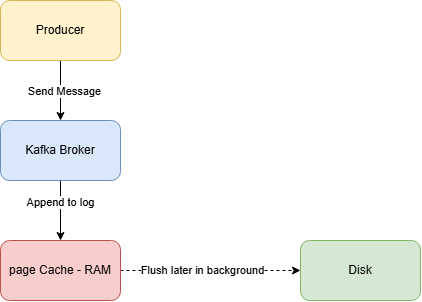
So, when we say Kafka “writes to disk,” what actually happens is Kafka writes to the server’s physical RAM — not the JVM heap, but the operating system’s own memory. The page cache is managed entirely by the Linux kernel, outside of Java. The Kafka broker process (a JVM application) simply calls append(), and the OS takes over from there. The data sits in the server's RAM until the OS decides to flush it to disk.
What if the machine crashes before flushing?
Good question. Kafka doesn’t rely on disk flushes for safety. Instead, it copies the data to multiple brokers (replication). If one machine dies before flushing, the others still have the data in their page cache or on their disk.
Trick 2: Kafka Doesn’t Read from Disk Either
This is the part that surprises most people.
When a consumer reads a message that was just written that message is still sitting in the page cache (RAM). The OS serves it directly from memory. No disk involved.
But Kafka goes one step further. In a normal Java application, sending data over the network looks like this:
The Normal Way:
- OS reads file from disk into page cache (DMA copy)
- App copies data from page cache into JVM heap (CPU copy)
- App copies data from JVM heap into socket buffer (CPU copy)
- OS sends socket buffer to network card (DMA copy)
That’s 4 copies of the same data and 4 context switches between user mode and kernel mode. The CPU wastes time just shuffling bytes around. The JVM heap fills up and garbage collection kicks in.
The Kafka Way — Zero-Copy:
Kafka uses a Linux system call called sendfile(). It tells the OS: "send this file directly to the network socket. Don't copy it to my application."
The data goes straight from page cache to the network card. The JVM never touches it.
With modern hardware, the CPU does zero copies. Only the hardware moves the data. That’s why it’s called “zero-copy.”
Putting It Together
Let’s trace a message from producer to consumer:
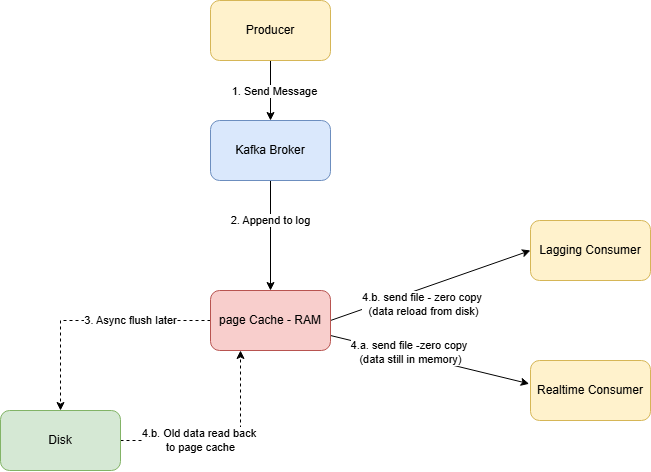
If the consumer is keeping up — the data is still in page cache. It flies straight from RAM to network.
If the consumer is lagging far behind — the data has been evicted from page cache. The OS must read it from disk first. This is much slower, and it’s why lagging consumers can hurt broker performance.
So Why Is Kafka Fast?
Kafka stores data on disk. But it almost never actually reads from or writes to disk in the hot path.
Writing: Messages go to RAM (page cache). The OS flushes to disk later in efficient batches. Durability comes from replication, not from disk sync.
Reading: Real-time consumers get data straight from RAM via zero-copy. The JVM is completely bypassed — no heap allocation, no garbage collection, no CPU wasted on copying bytes.
Sequential I/O: When disk access does happen, it’s sequential — which is thousands of times faster than random access.
Kafka is fast not because it avoids disk, but because it uses the operating system so well that disk barely matters.
If you turn on TLS/SSL, zero-copy won’t work. The broker needs to encrypt the data, so it has to pass through the JVM.
By Yasindu Dilshan on February 27, 2026.